


RTD MyRide
4.1569.00 Reviews
App Specs
- Version
- 7.9.6
- Updated On
- License
- Free
- Downloads
- 500,000+
- Developer
- Regional Transportation District, Denver CO
- Categories
- Travel & Local
- Platform
- Android, iOS
Screenshots
 Analysis by AppCompare
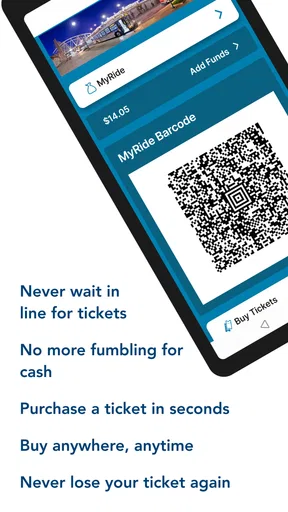
When I tested RTD MyRide, I came away with a fairly clear impression: it is most useful when you already plan to travel around the Denver area by public transportation and want the ride itself to feel less complicated. The app is built around a simple promise—scan and ride—and that focus makes it more practical than a general travel app for someone who regularly uses Regional Transportation District services.
It is a free Travel & Local app from Regional Transportation District, Denver CO, and it is aimed at everyday riders rather than tourists looking for a broad city guide. I would recommend it to commuters, students, occasional RTD passengers, and visitors who prefer having their transit access in one place. I would be more cautious about recommending it to someone who wants a complete trip-planning replacement for every transportation option in the region.
How RTD MyRide fits into a real trip
The most convincing part of the app is its direct connection to the riding process. Instead of treating public transportation as a collection of separate steps—finding a route, figuring out payment, locating a ticket, and then boarding—it gives the experience a more focused center. That matters on a busy morning, when the difference between a useful transit tool and an annoying one is often how quickly I can get from planning to boarding.
I found the app easiest to appreciate when I imagined a normal workday. I check the route I expect to take before leaving home, keep the app ready while walking to the stop, and use it again when I am close to boarding. If the trip involves a transfer, having the same RTD-focused tool available is less distracting than jumping between a mapping app, a browser page, and a separate payment method. The app does not try to turn the journey into a sightseeing experience, and that restraint is a strength.
Its store summary, “Scan and ride. Welcome aboard!”, reflects the practical purpose well without telling the whole story. The important point is not the slogan itself; it is that the app is designed around reducing friction at the moment a rider needs access. In my experience, a transit app earns its place on a phone when it helps me make a decision quickly and then stays out of the way.
That also explains why I would not treat it as a universal travel companion. If I am comparing rental cars, searching for a restaurant, or building a complicated itinerary that combines several unrelated operators, a general maps app may be more convenient. RTD MyRide makes more sense when RTD is central to the trip and I want a tool shaped around that network.
The strongest advantage is its focused workflow
Many transportation apps become cluttered because they try to cover every possible travel need. RTD MyRide feels more purposeful. Its identity is tied to RTD rides, so the useful question is not whether it can replace every app on my phone, but whether it makes RTD travel easier to manage. For that specific job, the focused design is a meaningful advantage.
Worth Reading Before You Choose

EA SPORTS FC Mobile 26 Is a Bigger Football Game, but It Takes Time

Flipboard Shows What News Apps Must Do Beyond the Feed

Switching to Android Auto Means Rethinking Your Driving Routine

Google Calendar Makes a Crowded Week Easier to Manage

Ludo King Makes the Most of the Minutes Between Plans

Baby Panda World Brings Quick Play to Modern Phones, but Its Game Library Feels Busy
A useful habit is to prepare before reaching the vehicle. I would open the app while still at the stop or station, confirm that I am using the intended account or ride option, and avoid waiting until the last second. That small change in routine is important because mobile ticketing and scanning are most stressful when the passenger is already standing at the door with people behind them.
Another practical use is keeping the app ready for a return journey rather than assuming the morning setup will be enough. A phone battery, network connection, or crowded boarding area can change the experience later in the day. I prefer to check the app before leaving my destination and make sure I can reach the ride screen without searching through several menus. This is not a glamorous feature, but it is the kind of workflow that makes a transit app feel dependable.
The app is also a better fit for riders who want a dedicated RTD experience than for people who only need occasional directions. A standard maps app may be faster for answering “how do I get there?” across different modes of transport. RTD MyRide is more relevant after I have decided that RTD is the way I want to travel and need a practical way to handle that choice.
What the rating and platform details suggest
The app has an average rating of 4.1 from around 1,400 ratings, with roughly 569 written reviews. I read that as a sign of generally positive day-to-day usefulness rather than proof of a flawless experience. Transportation apps are judged in demanding conditions: poor signal, low battery, rush-hour crowds, unfamiliar stops, and users who need the screen to work immediately. A solid rating in that environment is encouraging, but it should not create unrealistic expectations.
It has passed the half-million-install mark, which fits the role of a regional transit companion with a substantial audience. The app is free, so the decision to try it is relatively easy for an RTD rider. It is rated for Everyone, making it suitable as a general-purpose transit tool for households with different users, although younger riders may still need help understanding fares, routes, or safe travel habits.
The current version is 7.9.6, and the app runs on Android 8.0 or later. That compatibility is useful for people who keep an older phone, but it also gives me a practical reminder: a supported operating system does not automatically mean an old device will feel fast or have enough battery for a full day of travel. I would update the app before relying on it for an important trip and avoid treating it as my only backup if I am traveling somewhere unfamiliar.
Where the experience can become frustrating
The biggest weakness is not that the app has a narrow purpose; it is that narrow-purpose tools become very important at exactly the wrong moment when something goes wrong. If the phone is nearly out of power, the connection is unreliable, or the rider has not prepared the screen before boarding, a simple scan-and-ride workflow can suddenly feel less simple.
I would not wait until I am stepping onto a vehicle to install the app, sign in, or work out how the ride process functions. That is the kind of avoidable friction that can make a reasonable app seem unreliable. My advice is to set it up at home, explore the main ride flow when there is no time pressure, and keep a little extra time for the first trip. Once the process becomes familiar, the app is easier to trust.
There is also a difference between a transit app being useful and it being comprehensive. A rider who wants detailed city exploration, walking recommendations, or broad comparisons between buses, trains, cycling, rideshare, and driving may find a general mapping service more flexible. RTD MyRide is not the tool I would choose as my only travel planner for a multi-city trip. Its value is strongest when RTD travel is the main subject.
Another limitation is psychological rather than technical: a dedicated operator app can encourage users to focus on the app instead of the journey. I still need to pay attention to the stop, the vehicle, transfer timing, and the surroundings. Scanning successfully is not the same as understanding the whole route. I would use the app as one part of my travel routine, not as permission to stop checking the physical signs and announcements around me.
Small habits that make it more dependable
My first tip is to separate planning from boarding. Work out the intended trip before the vehicle arrives, then use the app for the final ride step. This keeps the phone interaction short and reduces the chance of blocking the boarding area while trying to solve a route question.
My second tip is to treat the return trip as a separate task. If I am visiting a large venue, a campus, or an unfamiliar neighborhood, I would check how I will leave before entering the destination. That is especially helpful when the return journey is later, when crowds and battery drain make last-minute preparation less comfortable.
My third tip is to keep a backup plan that does not depend entirely on the app. I would remember the general direction of the route, note the relevant stop, and carry enough phone power for the journey. This is not a criticism unique to RTD MyRide; it is sensible practice for any mobile transit system. The app can simplify the ride, but it should not be the only thing I know about getting home.
A fourth useful habit is to avoid testing a new workflow during a time-sensitive trip. If I am heading to an appointment, an exam, or an airport connection, I would use the app beforehand on a low-pressure journey. That lets me learn where the scan step appears and how quickly I can reach it. The benefit is less about discovering hidden complexity and more about removing hesitation when the bus or train is already waiting.
Who should use it, and who should choose something else?
RTD MyRide is a strong match for regular RTD passengers who want a dedicated way to handle their rides. Commuters can benefit from a repeatable routine, while students and occasional riders may appreciate having a focused tool instead of navigating a broad travel platform. It is also a sensible download for visitors who know they will use RTD several times and would rather prepare before arriving in Denver.
I think it is particularly useful for people who dislike carrying extra paper or switching between multiple transit-related screens. The free price removes a common barrier, and the Everyone rating makes it approachable for a wide range of passengers. The app also makes sense for someone who has already chosen public transportation and wants the boarding process to feel more organized.
I would skip it as a primary tool if my travel is mostly outside the RTD network, if I need one app to compare every transportation mode, or if I rarely use public transit and do not want to learn a dedicated workflow. In those cases, a general maps app may be more efficient. A visitor making only one simple trip might also prefer whatever transit tool they already understand, especially if they are trying to minimize the number of apps on their phone.
For families, I would prepare the ride process before leaving rather than handing the phone to a child at the vehicle door. For older phones, I would check performance and battery condition before depending on mobile access. For riders with tight connections, I would leave a margin for the ordinary uncertainties of public transportation instead of assuming the app can eliminate them.
My final assessment
After using it as a focused RTD companion, I see RTD MyRide as a practical specialist rather than an all-purpose travel platform. Its best quality is concentration: it is built for people who want to turn an RTD trip into a more manageable sequence, especially when scanning and boarding are the immediate priorities.
The trade-off is equally clear. The app cannot replace good route awareness, a charged phone, or a backup plan, and it may feel limited beside a broad mapping service. Those are meaningful considerations, but they do not cancel out its usefulness for the right audience. They simply define the conditions in which it works best.
My recommendation is straightforward: if you ride with RTD regularly, install it and learn the main workflow before your next important journey. If you are only looking for general directions across many transportation options, start with a broader travel app instead. For Denver-area riders who want a free, dedicated way to manage the ride itself, RTD MyRide is a sensible addition to the phone—provided you use it as a helpful transit tool, not as your entire travel plan.
Pros
- Real-time bus and train tracking helps reduce uncertainty at stops.
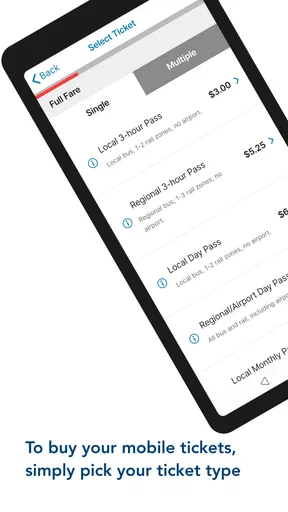
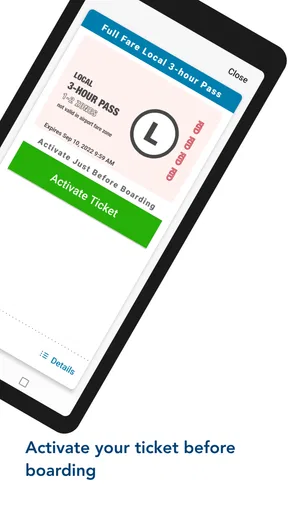
- Mobile ticket purchases can make boarding faster and more convenient.
- Trip planning combines routes
- schedules
- and transfer information in one app.
- Service alerts can warn you about delays
- detours
- and canceled trips.
- Saved routes and stops make frequent commuting easier to manage.
Cons
- Location and schedule data may occasionally be delayed or inaccurate.
- Some ticket features may vary depending on the RTD service or region.
- The interface can feel crowded when displaying multiple route options.
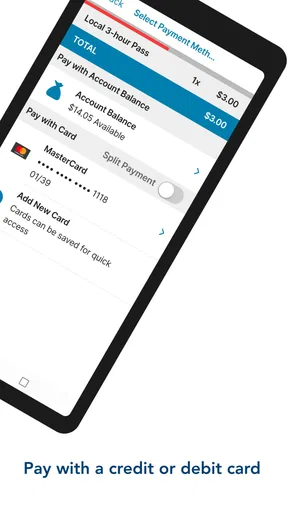
- An account or payment setup may be required for mobile ticket purchases.
- Battery and mobile data usage can increase when tracking trips continuously.
FAQs for RTD MyRide
What is RTD MyRide and what can I use it for?
RTD MyRide is the official mobile app for accessing services from the Regional Transportation District. It is designed to help passengers plan trips, view routes and schedules, check service information, and manage fare-related features in one place. Before downloading, remember that available tools and supported services may vary depending on your location, device, account status, and the RTD services operating in your area.
Can I buy or use transit fares through RTD MyRide?
The app may allow eligible passengers to manage digital fare products, view fare information, and use supported mobile ticketing or account features, depending on the current RTD system. Some passes, discounts, transfers, or payment methods may have specific conditions. Check the fare details inside the app before traveling, and keep an alternative payment method available in case your phone battery, connection, or app access becomes unavailable.
Does RTD MyRide provide accurate real-time bus and train information?
RTD MyRide can provide schedules, trip-planning results, alerts, and, where available, real-time vehicle information. However, estimated arrival times are based on operational data and may change because of traffic, weather, maintenance, detours, or unexpected delays. For important journeys, it is sensible to check the app shortly before departure and read service alerts rather than relying only on the scheduled arrival time.
Does RTD MyRide require an account, internet access, or location permission?
Some basic information, such as route searches or published schedules, may be accessible without signing in, while personalized features, stored payment options, or account management can require registration. Internet access is generally needed for current schedules, alerts, trip updates, and online transactions. Location permission is useful for nearby stops and directions, but you can usually search manually if you prefer not to share your location.
Is RTD MyRide available for both Android and iPhone, and what should I check before installing it?
RTD MyRide is intended for mobile users and may be available through the official Google Play Store and Apple App Store, subject to device compatibility and regional availability. Before installing, verify that the publisher is the official RTD organization, review the required permissions, and make sure your operating system is supported. Also check recent user reviews, update notes, and storage requirements before downloading.


